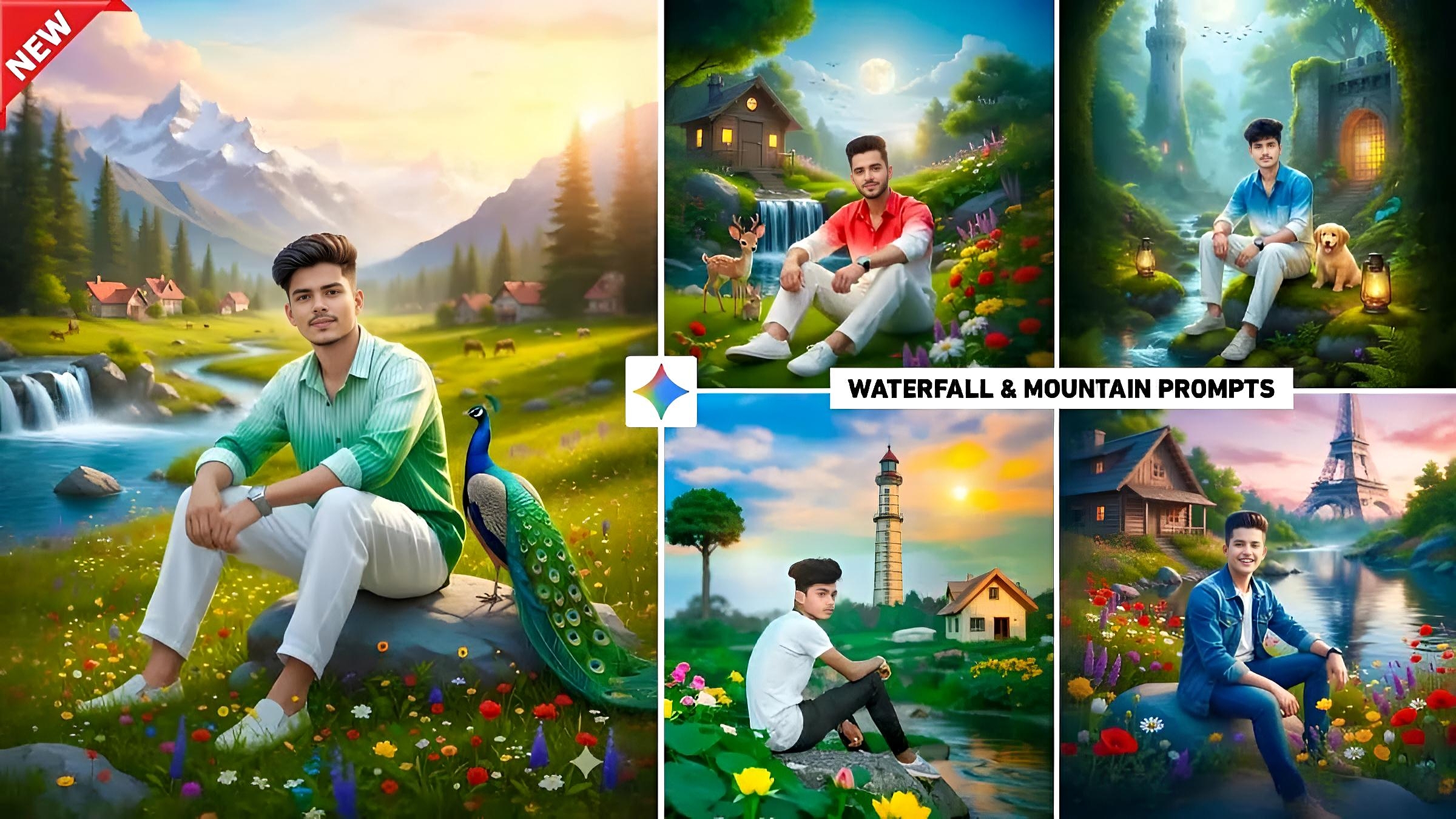
Google Gemini Waterfall & Mountain AI Photo Editing Prompt 2025 – Friends, did you know that a new AI photo editing app called Hypic has entered the photo editing world? People have been using this app extensively to create a variety of photos, and still do. Most people use this app to edit their photos by adding fantasy waterfalls and mountain village views. Today’s article is related to this. I will show you how to create photos with backgrounds similar to the ones in the Hypic app using Google Gemini. In this article, we will provide some prompts that will help you add mountain village animals, live plants, rivers, etc. to the background of your photos. This article will also provide five to six prompts for editing photos using Google Gemini, just like the Hypic app.
With these prompts you can easily edit any selfie with the same background in just one click. When you create a photo with such a background and upload it on Instagram your photo will definitely go viral because everyone loves to transform their photo into dreamy waterfall snowy mountains and fantasy background.
About Google Gemini Waterfall & Mountain Ai Photo Editing
I am giving a prompt to create a photo in such a background because when people used to create and post photos in such a background using the Hypic app, everyone’s photos used to get a lot of likes. And nowadays, when people create and post any kind of photo using Google Gemini, they get a lot of likes on their photos. So, we thought that if I give a prompt to create a photo in such a background with the help of Google Gemini itself, it would be even better. This trend went viral in 2025 because people want to show a combination of nature and fantasy in their social media photos. And the waterfall & mountain background gives a classy, royal, and travel-style look. To create a photo with Gemini, simply upload a clear selfie and paste the prompt. Gemini makes the photo in no time.
Google Gemini Waterfall & Mountain Ai Photo Editing Prompt Copy Paste
Use my uploaded selfie exactly as it is and keep my full body, face, hair, skin tone, clothes, and expression unchanged. I’m sitting on a rock wearing a green–white gradient half-line shirt (not unbuttoned not a T-shirt). white loose pants and a watch. Keep my legs fully visible and place me in the center. Add a real peacock beside me without spreading its feathers. Create a bright colorful dreamy valley with fresh green grass vibrant flowers in the foreground a clean flowing river and cows and horses grazing in the background. Add a large slow waterfall on the left with blue water and soft mist. In the distance place small mountain village houses with orange roofs tall pine trees, and shining snow-capped mountains under a warm pastel sky. Everything must look photographic hyper-realistic, high-detail natural lighting, DSLR-quality no cartoon, no painting, no smoothing.
Use my uploaded selfie exactly as it is. Keep my real face, age, skin tone, hairstyle, and body language unchanged. I’m sitting on green grass in a natural stylish pose wearing a red–white gradient half-lining shirt (not a T-shirt) white loose pants white shoes, and a watch. Create a hyper-realistic outdoor scene with vibrant flowers, detailed greenery, soft natural light, a small waterfall, and me in the center. Then, add a cute deer and rabbit on my left. Also, include a full moon, light blue sky, flying birds, and a wooden hutch with warm lights. Finally, make everything look photographic, sharp, and DSLR-real with natural shadows no cartoon or digital art.
Use my uploaded selfie exactly as it is. Keep my real face, expression, age, skin tone, hairstyle, and jawline unchanged. I’m sitting naturally on a rock beside a bright flowing stream wearing a blue–white gradient half-lining shirt white loose pants shoes and a watch no T-shirt. Add a cute dog next to me, soft green moss lush greenery and a fantasy-style forest. “Place two warm glowing lanterns on both sides of me. Then behind me add a tall castle-like tower on the left and a stone fortress gate with warm light on the right. Also, keep the sky pale blue with a shining moon and soft sunlight. Finally, make everything hyper-realistic, vibrant, sharp, and DSLR-quality with natural shadows — no cartoon or digital art.
Use the face in my uploaded photo to create a realistic image of the boy wearing black pants and a blue denim jacket over a white T-shirt. Also, he’s sitting by a river, surrounded by a setting blue sky and colorful flowers. Moreover, next to him is a wooden house with a river flowing nearby. Lush trees and some rocks are also visible in the background. A large Ofil Tower is visible.
How To Use Google Gemini Waterfall & Mountain Ai Photo editing Prompt
You’ve seen the picture, and the prompt for creating a photo is given in it. Now, this paragraph explains how you can copy the prompt you saw and create a photo just like the one you saw in Google Gemini using just a selfie. I am sharing some points below. So, read them one by one and follow them in Google Gemini. Then, your photo will be created easily.
- Once the Google Gemini website opens you need to select the “Create Image” option.
- You will see a plus icon at the bottom. Click on it in the left corner and then click on upload file.
- Now add a picture from your gallery in which your face is clearly visible.
- Paste the prompt that you copied into the message box.
- Now you will see a send icon in the right corner click on it.
- Please wait a moment.
- After waiting for a while your photo will be created.
- Click on your photo and then click on the small download icon at the top to save the photo.
Conclusion
Ultimately Ai photo editing has given a new direction to our creativity. Now, just by writing a good prompt, we can transform our normal selfie into a realistic, cinematic and attractive photo. Its biggest advantage is that the photo does not look edited everything looks natural sharp and real. I feel that in the coming times, AI will become even more powerful. Editing has truly become a game changer for photo lovers. To give your photo a cinematic look with mountain house water, do try using the prompts given by us.
